From Two Weeks to Thirty Minutes: How MainEvent Changed in 2025
Four customers on the improvements that mattered most, from AI-powered reporting to duplicate detection to automated alerts.
When you’re processing 3,000 to 6,000 events every two weeks, the small stuff compounds fast. A duplicate venue here, a bad address there, an extra click to approve a claim. None of it seems like a big deal until you’re doing it thousands of times.
Stephanie Machalek, National Program Logistics and Insights Manager at TEAM Enterprises, has been living that reality. When MainEvent introduced the duplicate merge tool this year, the impact was immediate.
“When the duplicate merge tool was introduced, it drastically reduced the number of accounts we had in our system. This was a very painful process to do manually. The fact that everything you see you can download and then instantly upload to the merge tool was an overnight difference with how we managed our accounts.”

Stephanie Machalek, National Program Logistics and Insights Manager
That kind of operational improvement defined 2025 for MainEvent. Cleaner data, tighter workflows, smarter reporting, and an AI layer that turned weeks of manual analysis into a 30-minute conversation. Here’s what changed across four customer operations.
The Data Foundation
Duplicate Detection and the Merge Tool
The biggest operational addition this year: AI-powered duplicate detection for photos and recap data. The system flags potential duplicates across your entire program with a similarity score, so you can decide what’s legitimate and what isn’t. Narrow results to individual staff members, view specific events, and see exactly where the overlap is happening.
Cleaner Addresses, Cleaner Reporting
We rebuilt the location search with API-powered address validation that standardizes entries automatically and prevents duplicates before they’re created.
“With the Google API, either if they're trying to add a venue or search for it, it comes up very standardized, and if it's in the system already, they can't even add a new one, which helps us keep our database clean.”
Stephanie Machalek, National Program Logistics and Insights Manager
Workflow Enforcement
New permissions enforce a strict order: check-in, then recap, then check-out, then claim submission. Staff can’t skip steps. This prevents the most common data quality problem in field marketing: claims submitted before recaps are complete, recaps filed without check-in timestamps, and approvals hitting the queue with gaps in the underlying data. Configure it once at the program level and the system handles it for every event.
Operations at Scale
Alerts That Replaced the Text Message Chaos
Perla Peralta owns Peralta Experiences, an experiential agency that handles brand ambassador staffing. Before MainEvent’s alert system, her team was managing communications manually.
“One of the main reasons we went with you guys was because of these alerts. We were personally sending out emails, text messages, reminders to staff, and we're a very small unit. We're having text messages with people in 20 different locations doing three different types of jobs. It just got clunky.”

Perla Peralta, Owner
The automated alert system sends confirmations the moment staff are booked, plus 24-hour and 1-hour reminders before shifts. A missed reminder can mean a no-show, and a no-show at a high-stakes activation can cost a client relationship. Each alert can be tailored by client, event type, and venue, with both email and SMS delivery and dynamic template variables.
Claims Processing at Scale
Mass approval and mass decline let teams filter by common issues and process claims in bulk instead of one at a time.
“The introduction of mass approval and mass decline has been amazing. Being able to separate by using filters, finding a common issue, and then selecting those certain claims without having to individually write the same comment has been amazing for all the people that approve those claims. We have anywhere between 3 to 6 thousand events every two weeks and that has been a huge lifesaver, whether it's approving or declining.”
Stephanie Machalek, National Program Logistics and Insights Manager
A new two-tier approval system lets field managers handle the first pass while client headquarters gets a second review before anything hits payroll.
Faster Insights, Better Deliverables
Dashboards and Saved Filters
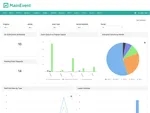
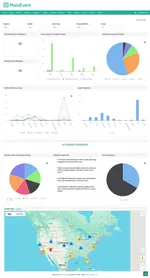
Josh Rubin, Sr. Director of Regional Marketing Operations at Monster Energy, built purpose-specific dashboard views for different teams: weekly manager recaps, brand-specific dashboards, and product tracking by territory.
“Being able to visualize the data is extremely helpful when we’re having conversations on both recapping and seeing where we were, and also planning out and coaching our teams for the future. It’s a great way to have those conversations and more of a teaching piece to talk to our teams about where we can see some opportunities for improvement.”
New filters for region, district, recap definition, and location chains make it easier to drill into the data that matters. Save a complex filter, share it with your team, and everyone sees the same view.
 Click to expand
Hope Harl, Account Supervisor at 160over90, manages Pernod Ricard and Southern Glazers accounts with approximately 400 events per month. On peak days like St. Patrick’s Day, they run 200 events in a single day.
“We can be doing 400 events in a month. St. Patrick's Day has like 200 events. We're able to really narrow that down, find those specific events, and really look at the data, but then also look at whether the recap has been filled out.”

Hope Harl, Account Supervisor
Media Gallery and Auto-Tagging
Before the media gallery improvements, finding the right photos for a client deliverable meant digging through folders sorted by date and hoping someone named the files correctly. Now, media tags and filters let you search by event type, staff name, or location chain, with quality options for exports so you’re not waiting forever for huge files.
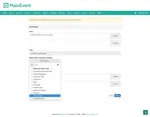
Auto-tagging makes it automatic. When admins configure a recap upload field, they pre-assign media tags. If a field asks for setup photos, every upload through that field gets tagged “Set-Up Shot.” Field reps don’t do anything differently. The categorization happens at the point of capture.
Reports on Autopilot
The biggest reporting upgrade: automated delivery. Schedule any report for email, FTP, or API delivery on a daily, weekly, monthly, or quarterly cadence. Your Monday morning report arrives without anyone lifting a finger, and every delivery is logged with start time, finish time, and status. For teams using Tableau, Power BI, or other external tools, the FTP and API options mean MainEvent data flows directly into your existing stack.
“We pull down reports to look at the hard data, like how many samples are provided, what's the bar spend. But we're also able to do a fast, quick glimpse of what data is missing, and then our market manager will go and hunt those brand ambassadors down to make sure they fill those recaps out.”
Hope Harl, Account Supervisor
AI That Recommends Where to Activate Next
All of the improvements above, cleaner venues, standardized addresses, enforced workflows, better reporting, feed into the most significant new capability MainEvent shipped in 2025.
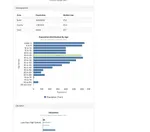
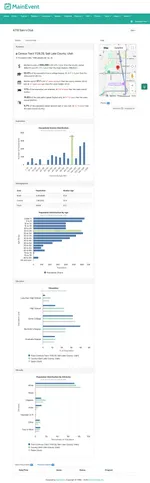
mAInevent Agents lets teams generate reports, pacing analyses, and program rollups using plain language. But the standout capability goes beyond reporting. Agents combines your program data with U.S. Census demographics, including median income, age distribution, education levels, and ethnicity at the census-tract level, to surface where to activate next based on where you’ve already succeeded.
Perla Peralta at Peralta Experiences started using Agents when her agency picked up clients who needed data-driven insights. The problem: multi-SKU reporting across dozens of events was taking weeks to compile manually.
“Before, I was downloading Excel sheets and I was like, 'What am I trying to find from over here?' If one of my clients has seven SKUs and we're trying to do it all manually, we're talking hours. Sometimes you have to take a few hours and pause, come back the next day. It could take me two weeks to really get a useful report for a client. Now I can knock it out in 30 minutes.”
Perla Peralta, Owner
She used Agents to plan a second wave of store activations.
“I can actually ask the agent, 'What store should we be visiting?' And it's actually looking at what stores did well, the social demographic of that store, and then looking at other stores with similar age ranges, similar median income. And it'll tell me, 'You should check out Sprouts one, two, three, and this is why.' That was mind-blowing.”
Perla Peralta, Owner
She didn’t just read the report. She acted on it.
“We took that knowledge provided by the agents, went to those stores, and they performed just as well as some of their higher stores on the previous run.”
 Click to expand
The quality of Agent output depends on the quality of the data going in. Every improvement described in this post, from duplicate detection to workflow enforcement to cleaner addresses, feeds directly into making these results possible.
Want to see what Agents can do with your program data? Schedule a call
What Else Shipped
We pushed updates every two weeks throughout 2025. Beyond the features above:
- RSVP invitation improvements with staff distance, rate, and experience columns
- Overtime compliance flags
- Specialty skill filters (mechanic, driver, bilingual)
- New RSVP notifications index
- State/province dropdowns on the staff app (no more “Tx” vs “TX”)
- Multi-photo uploads on staff profiles
- Command+click for new tabs
- Minute-level shift reminder increments
- Loading indicators on filters
- Allocation logging with full edit history
“Whether it's a bug or a new feature or an addition to a feature that's already available, just having that every-two-weeks cadence and knowing things are in the pipeline has been a huge help. It's been fantastic.”
Stephanie Machalek, National Program Logistics and Insights Manager
We’ll be sending the complete 2025 release notes in our next newsletter, covering every improvement across all 18 releases. If you want the full breakdown, subscribe below.
And one final thought from Monster Energy, where Josh Rubin’s teams have been using MainEvent for five years across consumer engagement and brand ambassador programs nationwide.
“We've been approached by other vendors and nothing has come close to the capabilities of what this is. And we're not easy at Monster.”

Josh Rubin, Sr. Director Regional Marketing Operations